OMR Information Systems Company
OMR Scanners OMR Software
Reading Technology Program Types
OMR Sheets Supplies Support
About Us Company Profile Announcements Q&A Resources Quote Request OMR Guides Access Statistics
Self-Reading PRO
Home/OMR Software/Program Types

OMR Grading Software

Professional OMR grading software built for education. Five editions support grading at schools, universities, academies and organizations.

Windows only Installed · movable between PCs Excel · CSV export License key activation

Software Editions

5 professional grading software editions optimized for each use

Why Edu24 software

OMR software developed in-house by Edu24, from scanning to output

Edu24 develops every part of its software in-house, from scanner reading to grading and output. It comes in five editions for the different testing practices of schools, universities, academies and organizations, each with the features that setting needs.

5Editions by purpose
3Output formats (NEIS CSV · Excel · PDF)
0No server needed — runs on a PC
TWAINDirect scanner control · simplex · duplex
PYTHON READING ENGINE

Built in Python, the language of choice for image recognition

OMR software has long been written in C and C++. Edu24 built a new reading engine in Python — the language favored in image recognition and AI — with the OpenCV and NumPy image-processing libraries, handling sheet alignment and mark recognition through image processing.

Conventional OMR softwareC · C++
Edu24 reading enginePythonOpenCV · NumPy
Actual software screens
Edu24 NEIS
Edu24 NEIS
Edu24 School
Edu24 School
Edu24 Campus
Edu24 Campus
How it works
1ScanAnswer sheets read by a TWAIN scanner
2ReadPosition correction by timing marks · mark recognition
3GradeScores calculated against the answer key
4OutputNEIS CSV · Excel · individual score report PDF
Six reasons we recommend it
01
In-house Python reading engine

Corrects sheet position using timing marks, with darkness, area and noise sensitivity adjustable to each sheet.

02
Works with your scanner as is

Controls the scanner directly via TWAIN using the manufacturer driver settings, for both simplex and duplex scanning.

03
Results ready for NEIS

Exports results as a CSV file ready to upload to NEIS, Korea’s national school information system — no manual re-entry needed.

04
One PC, no server

Each test session is stored on the PC as an SQLite file — no server needed, and copying the session folder is a full backup.

05
Excel and PDF reports

Exports results to Excel (.xlsx) and creates an individual score report PDF for each student.

06
Automatic updates

The software checks for new versions and installs them automatically, so it is always up to date. (Except Edu24 School)

Feature comparison by edition
Feature comparison by editionEdu24
NEIS
Edu24
School
Edu24
Campus
Edu24
Pro
Reads directly with a scanner–
Grades imported NEIS reading results (CSV)–––
CSV for NEIS upload––
Excel (.xlsx) export–
Individual score report PDF––
Automatic updates–
Operating system64bit32 · 64bit32 · 64bit32 · 64bit
Which edition fits you
Request a Quote 070-4024-0094

Edu24 NEIS

For: middle and high schools across Korea — regular exams (midterms and finals)

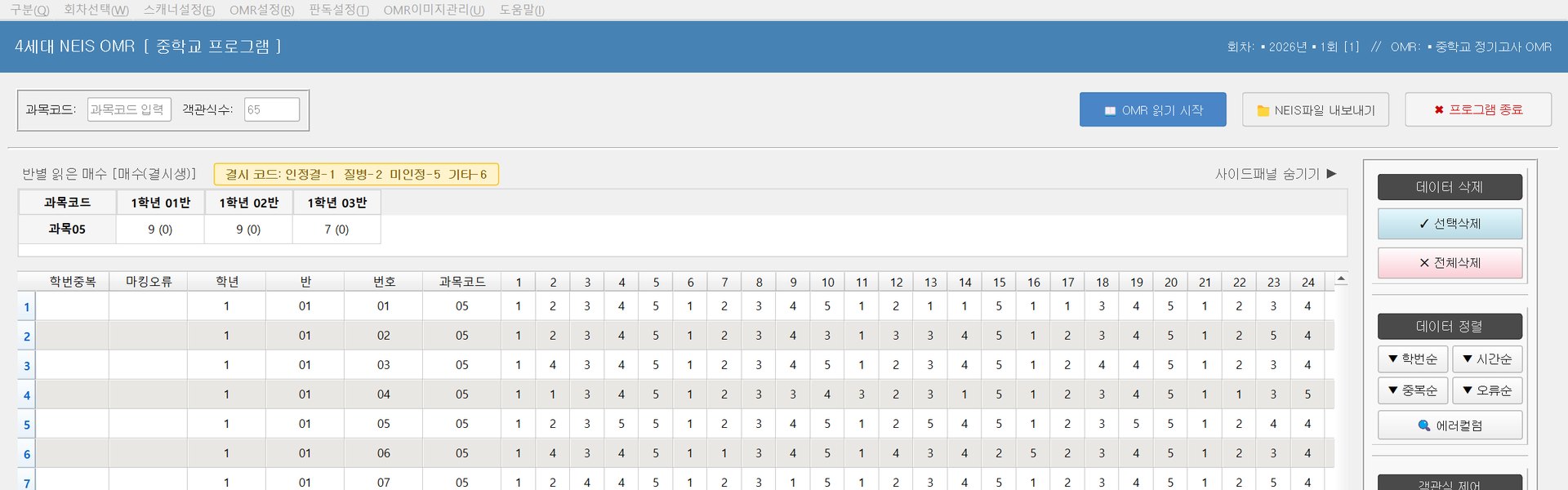
OMR grading software specialized for middle and high school regular exams. It automatically reads 4- and 5-choice multiple-choice answers and outputs results in the format required for NEIS grade processing. It supports every function needed for regular exams, including batch grading by subject and class, multiple correct answers and weighted scoring.

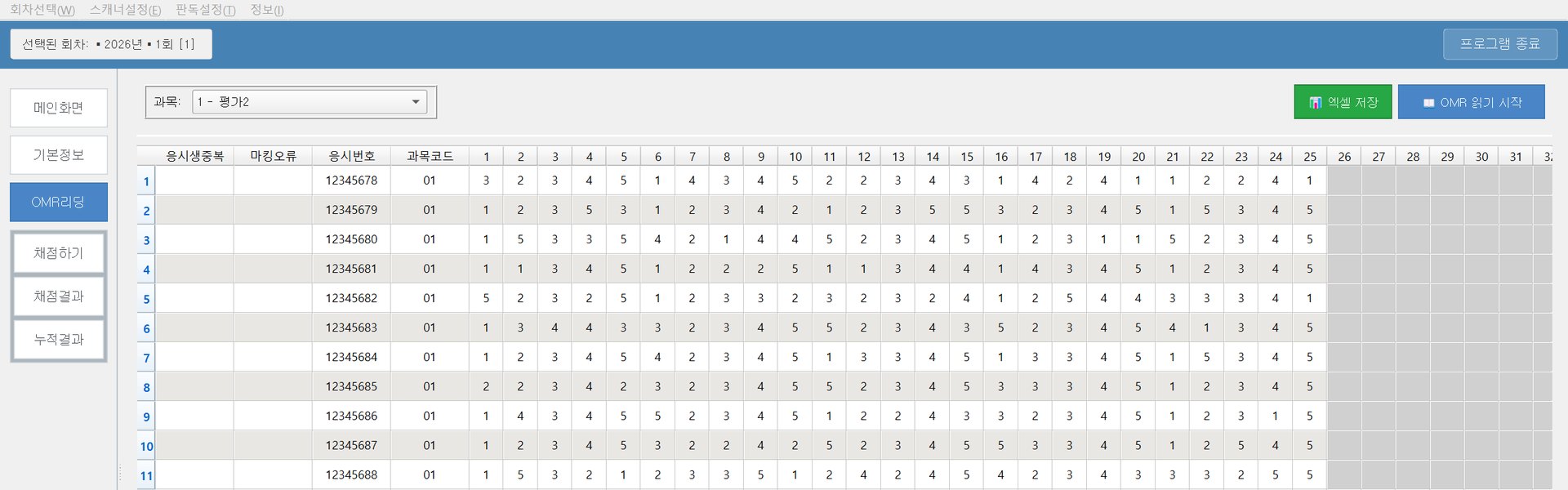
Edu24 NEIS OMR reading screen (sheets read per class and answer list)
Engineering & Technical Specifications
Programming languages
Python 3.13 · C# 12 (.NET 8) · PHP 8 · JavaScript (Node.js) · SQL (SQLite 3)
Reading engine
OpenCV · NumPy image processing — position correction by timing marks, adjustable darkness, area and noise sensitivity
Scanner control
Direct TWAIN control — uses the manufacturer driver settings, simplex and duplex scanning
Data storage
Per-session SQLite files — stored on the PC with no server, back up by copying the session folder
Code protection · Distribution
PyArmor code obfuscation, packaged as an executable
Updates
A dedicated updater (C# · .NET) installs new versions automatically
Output
CSV file for NEIS upload
Operating system
Windows 10 / 11 (64-bit)
Key Features
Automatic grading of 4/5-choice questions Multiple correct answers Weighted scoring Batch grading by subject Scores separated by class Per-question correct rate analysis Automatic ranking/grade calculation CSV for NEIS upload
System Requirements
Operating system
Windows 10 / 11 (64bit)
Processor
Intel Core i3 or higher (i5 recommended)
Memory
4GB RAM or more (8GB recommended)
Storage
500MB or more free space
Display
1280×720 or higher (1920×1080 recommended)
Other
TWAIN-compatible scanner, USB port
Request a Quote 070-4024-0094

Edu24 School

For: all grades in middle and high schools

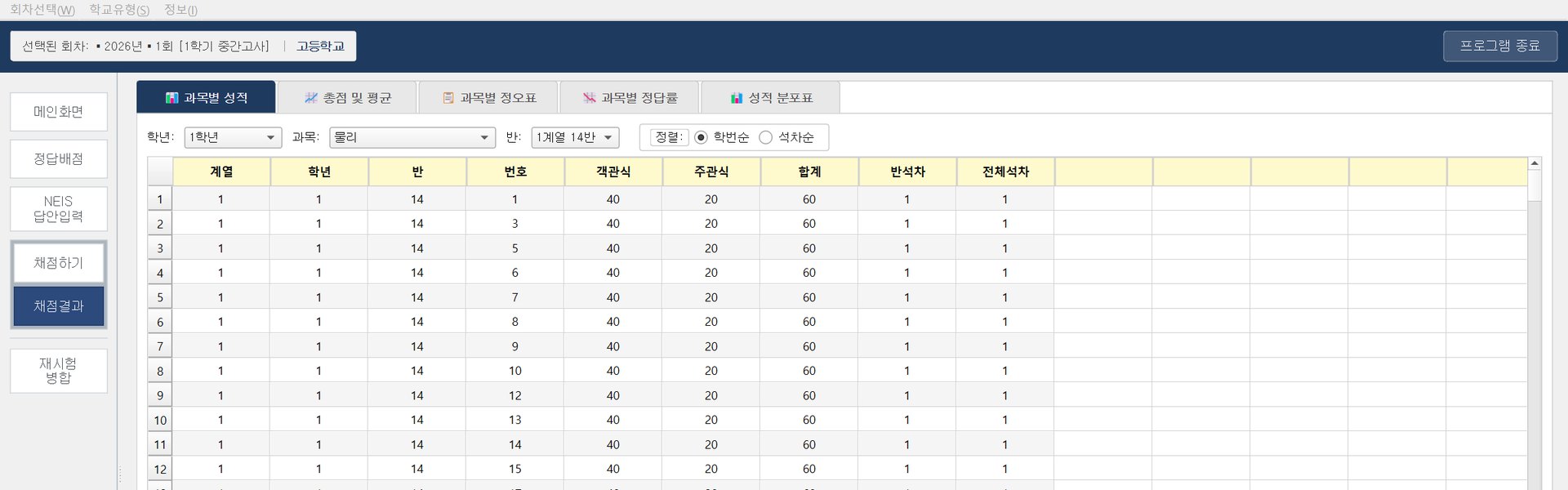
General-purpose grading software optimized for everyday tests in middle and high schools. It supports many test types beyond regular exams — unit assessments, pop quizzes, performance assessments and more — and its simple UI lets teachers use it right away without training.

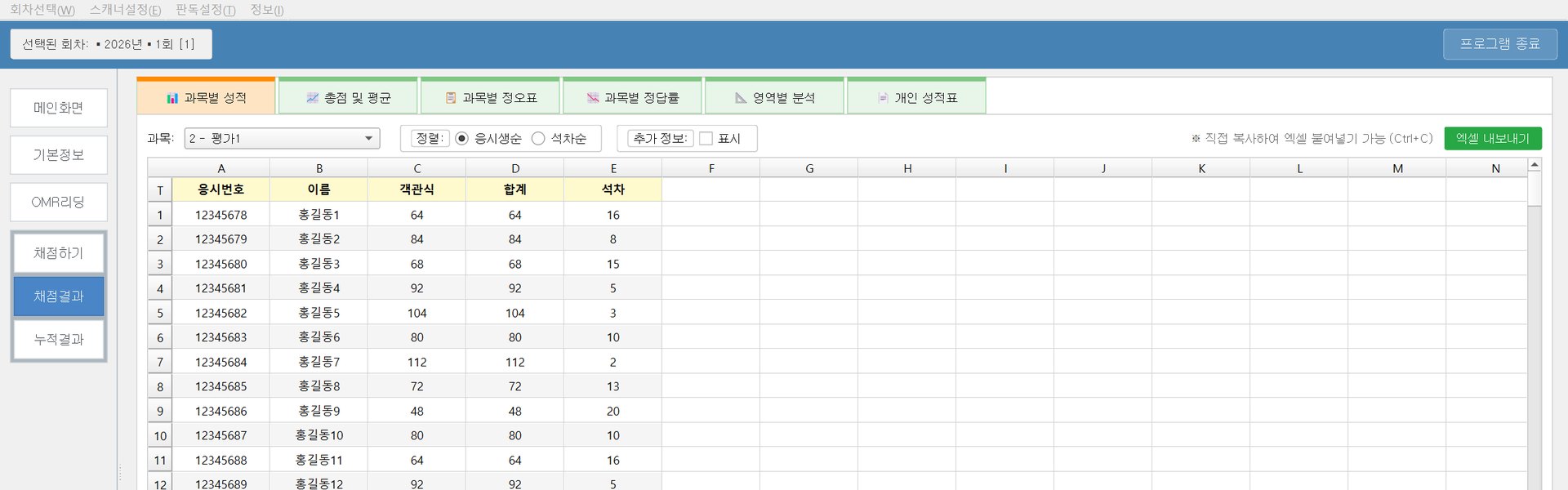
Edu24 School subject score screen
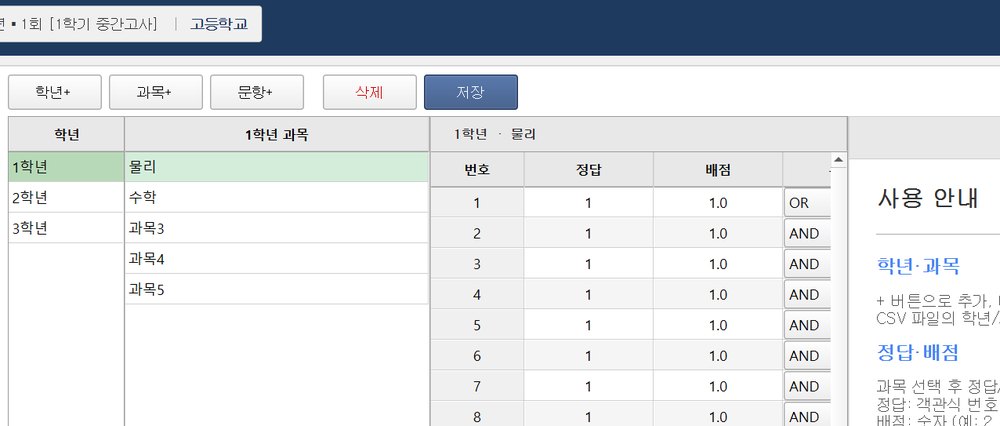
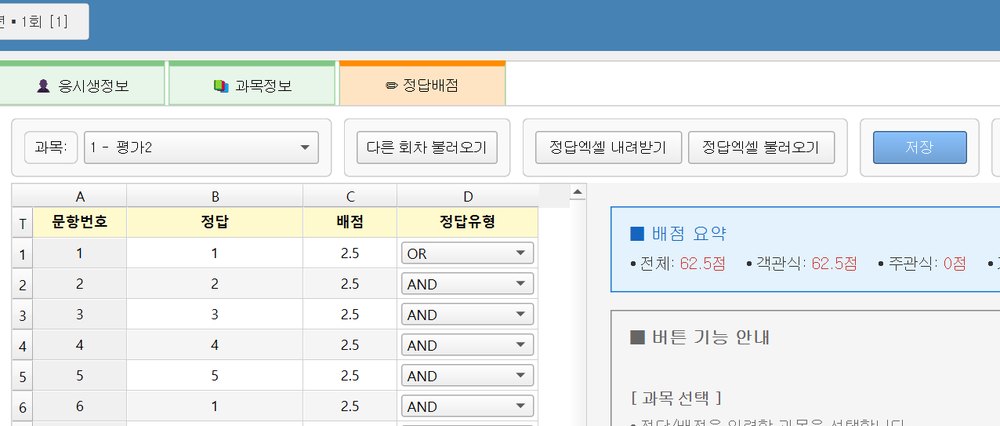
Answer key and point settings by grade and subject
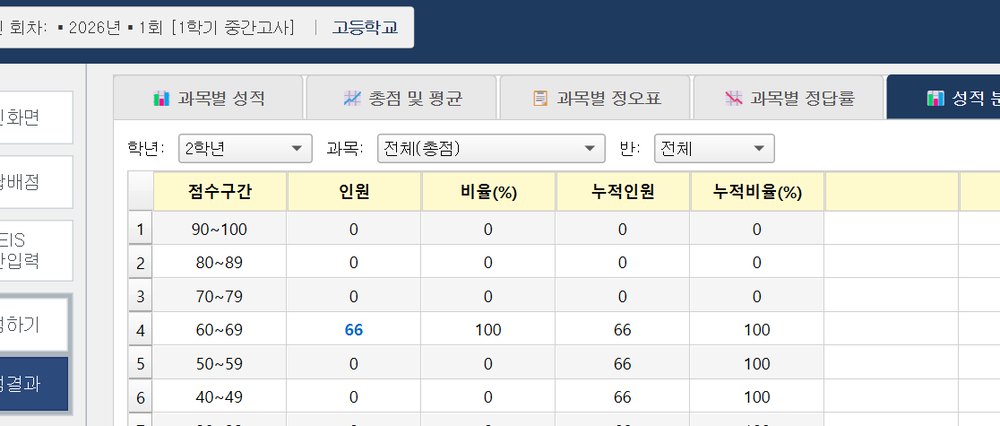
Score distribution table screen
Engineering & Technical Specifications
Programming languages
Python 3.13 · C# 12 (.NET 8) · PHP 8 · JavaScript (Node.js) · SQL (SQLite 3)
Answer input
Imports NEIS OMR reading results (CSV) — grading without a scanner
Data storage
Per-session SQLite files — stored on the PC with no server, back up by copying the session folder
Code protection · Distribution
PyArmor code obfuscation, packaged as an executable
Output
CSV for NEIS upload · Excel (.xlsx) export
Operating system
Windows 10 / 11 (both 32-bit and 64-bit)
Key Features
Free question count setting Individual point values Multiple correct answers Report cards by class Wrong-answer analysis by student Question difficulty analysis Automatic discrimination calculation Instant export to Excel
System Requirements
Operating system
Windows 10 / 11 (both 32-bit and 64-bit)
Processor
Intel Core i3 or higher
Memory
4GB RAM or more
Storage
300MB or more free space
Display
1280×720 or higher
Other
Imports NEIS OMR reading results (CSV) — grading without a scanner
Request a Quote 070-4024-0094

Edu24 Campus

For: universities · graduate schools (midterms, finals, certification exams)

Dedicated grading software optimized for large-scale university exams. It has features that fit university academic systems, such as automatic application of relative grading (A–F) ratios, switching to absolute grading, and re-exam management.

Edu24 Campus OMR reading screen (answers by examinee number)
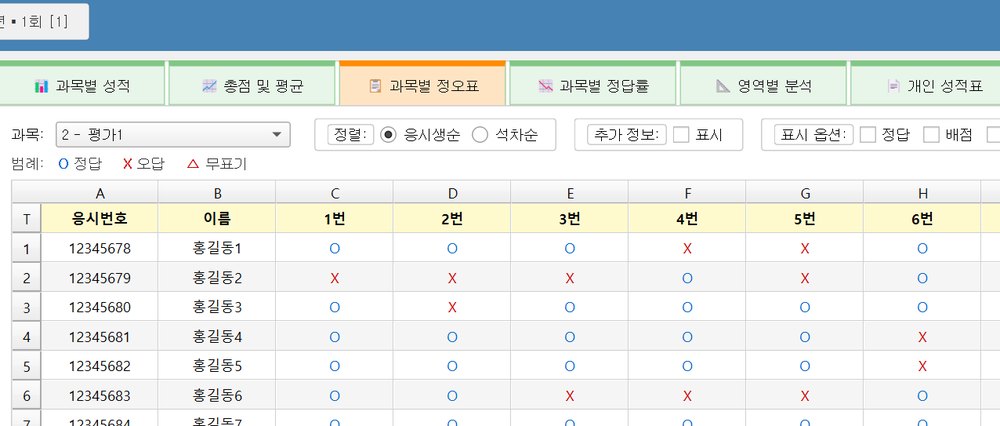
Item-by-item correct/incorrect table
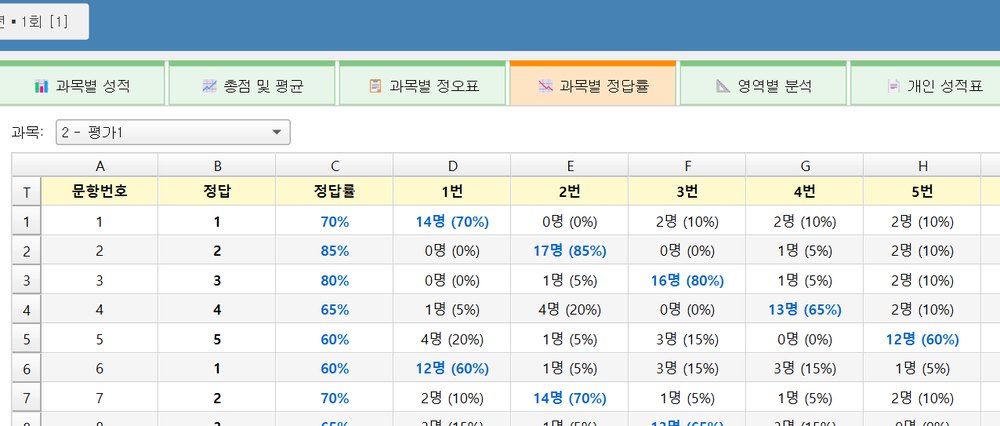
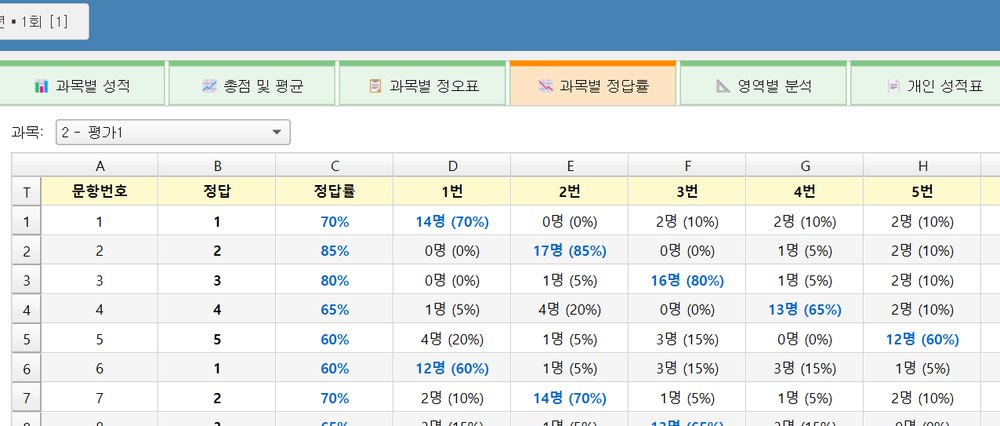
Correct-answer rate by item for each subject
Engineering & Technical Specifications
Programming languages
Python 3.13 · C# 12 (.NET 8) · PHP 8 · JavaScript (Node.js) · SQL (SQLite 3)
Reading engine
OpenCV · NumPy image processing — position correction by timing marks, adjustable darkness, area and noise sensitivity
Scanner control
Direct TWAIN control — uses the manufacturer driver settings, simplex and duplex scanning
Data storage
Per-session SQLite files — stored on the PC with no server, back up by copying the session folder
Code protection · Distribution
PyArmor code obfuscation, packaged as an executable
Updates
Checks for a new version at launch and updates automatically
License activation
License key verified with our server (HTTPS)
Output
Excel (.xlsx) export · individual score report PDF
Operating system
Windows 10 / 11 (both 32-bit and 64-bit)
Key Features
Handles large class enrollments Independent grading by department and section Automatic relative grading ratios Switch to absolute grading mode Re-exam/make-up exam management Automatic matching by student ID Exam history per professor Batch output of Excel score sheets
System Requirements
Operating system
Windows 10 / 11 (both 32-bit and 64-bit)
Processor
Intel Core i5 or higher (recommended)
Memory
8GB RAM or more (16GB recommended)
Storage
1GB or more free space
Display
1920×1080 recommended
Other
TWAIN-compatible scanner
Request a Quote 070-4024-0094

Edu24 Pro

For: private academies (cram schools), public offices, companies, research institutes, associations

General-purpose OMR grading software for organizations beyond schools. It handles certification exams, promotion exams, aptitude tests, surveys, satisfaction evaluations and more.

Edu24 Pro subject score screen
Answer key and point settings screen
Correct-answer rate by item
Engineering & Technical Specifications
Programming languages
Python 3.13 · C# 12 (.NET 8) · PHP 8 · JavaScript (Node.js) · SQL (SQLite 3)
Reading engine
OpenCV · NumPy image processing — position correction by timing marks, adjustable darkness, area and noise sensitivity
Scanner control
Direct TWAIN control — uses the manufacturer driver settings, simplex and duplex scanning
Data storage
Per-session SQLite files — stored on the PC with no server, back up by copying the session folder
Code protection · Distribution
PyArmor code obfuscation, packaged as an executable
Updates
Checks for a new version at launch and updates automatically
License activation
License key verified with our server (HTTPS)
Output
Excel (.xlsx) export · individual score report PDF
Operating system
Windows 10 / 11 (both 32-bit and 64-bit)
Key Features
Fully flexible question settingsVarious numbers of choices (2–10)Survey tally modePass/fail criteria settingsMinimum score per areaAutomatic exam number recognitionIntegrated multi-subject scoringExcel / CSV export
System Requirements
Operating system
Windows 10 / 11 (both 32-bit and 64-bit)
Processor
Intel Core i3 or higher
Memory
4GB RAM or more
Storage
300MB or more
Display
1280×720 or higher
Other
TWAIN-compatible scanner
Request a Quote 070-4024-0094

Edu24 Custom

For: any organization with special requirements

We handle special grading and tallying requirements that the 4 standard editions above cannot meet, developing and delivering dedicated software tailored to each organization’s own processes.
Engineering & Technical Specifications
Programming languages
Python 3.13 · C# 12 (.NET 8) · PHP 8 · JavaScript (Node.js) · SQL (SQLite 3)
Reading engine
OpenCV · NumPy image processing — position correction by timing marks, adjustable darkness, area and noise sensitivity
Scanner control
Direct TWAIN control — uses the manufacturer driver settings, simplex and duplex scanning
Data storage
Per-session SQLite files — stored on the PC with no server, back up by copying the session folder
Code protection · Distribution
PyArmor code obfuscation, packaged as an executable
Updates
Checks for a new version at launch and updates automatically
License activation
License key verified with our server (HTTPS)
Output
Excel (.xlsx) export · individual score report PDF
Operating system
Windows 10 / 11 (both 32-bit and 64-bit)
What we can handle
Non-standard OMR answer sheet formatsSpecial scoring systemsOrganization-specific statistical analysisFeature additions to existing softwareUI/report customizationData integration with external systemsMultilingual interfaceMaintenance contract support
Technology Stack
Programming languagePython 3.13 · C# 12 (.NET 8) · PHP 8 · JavaScript (Node.js) · SQL (SQLite 3)
DatabaseSQLite 3 (default) / separate DB negotiable for large scale
DeploymentInstalled (movable to another PC)
Activation methodLicense key (default) / negotiable per organization
Development periodAgreed after requirements analysis (typically 2–8 weeks)
DeliverablesSoftware + user manual + operator training
MaintenanceFree for 1 year after delivery / annual maintenance contract thereafter
System Requirements
Operating system
Windows 10 / 11 (both 32-bit and 64-bit)
Processor
Negotiable depending on project scale
Memory
Negotiable depending on project scale
Storage
Negotiable depending on project scale
Display
1280×720 or higher
Other
Negotiable depending on requirements

Get a recommendation for the right grading software

We'll guide you to the right software for your organization type and exam scale

Request a Quote 070-4024-0094